
Gesture Animations Pack gives a Humanoid character 17 hand gestures — thumbs up, pointing, heart, OK, shush, facepalm and more. Each gesture comes two ways:
- a masked animation clip that plays over whatever your character is already doing — idle, sitting, talking, walking — on an Animator layer with an avatar mask;
- a full-body take, in two FBX files: the gesture combined with a sitting idle and with a standing idle.
Both idles and a sample scene are included. The animations need no scripts.
Requirements
- Unity version: 2022.3 or newer.
- Rig: Humanoid. The clips rely on Mecanim retargeting, so generic and legacy rigs are not supported.
- Render pipeline: any, for the animations, masks and controllers. The sample scene and the sample character’s materials use URP — see Render pipelines for Built-in and HDRP.
Video
- Gesture Animations Pack for Unity — every gesture, seated and standing.
The gestures
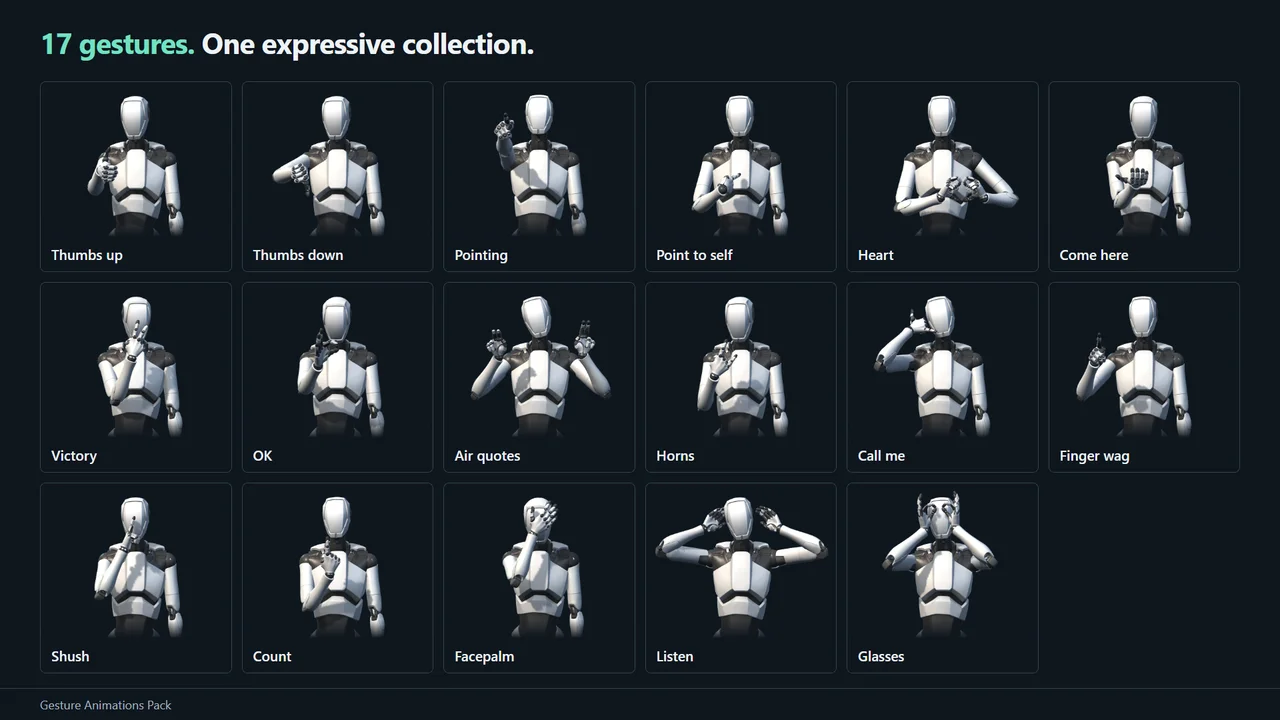
The mask column says which avatar mask a gesture’s layer needs. The three timing columns are the transition settings the included controller uses — copy them when you build your own layers.
| Gesture | What it does | Mask | Masked clip, s | Fade in, s | Fade out starts at, s | Fade out, s | FBX take, s |
|---|---|---|---|---|---|---|---|
air_quotes |
Both hands at the head make two “quote” flicks | both_arms_head |
2.70 | 0.60 | 2.00 | 0.70 | 3.2 |
call_me |
Hand as a phone at the ear | right_arm_head |
2.70 | 0.60 | 2.00 | 0.70 | 3.2 |
come_here |
Palm up, beckons with the fingers three times | right_arm_head |
2.90 | 0.60 | 2.30 | 0.60 | 3.4 |
count |
Counts one to five on the fingers | right_arm_head |
7.90 | 0.60 | 7.20 | 0.70 | 8.4 |
facepalm |
Palm over the eyes, the head shakes “no” | right_arm_head |
3.30 | 0.60 | 2.60 | 0.70 | 3.8 |
finger_wag |
“No-no” with the index finger | right_arm_head |
2.90 | 0.60 | 2.20 | 0.70 | 3.4 |
glasses |
Finger rings in front of the eyes like glasses | both_arms_head |
3.20 | 0.70 | 2.50 | 0.70 | 3.6 |
heart |
Heart shape with both hands at the chest | both_arms |
2.90 | 0.70 | 2.20 | 0.70 | 3.4 |
horns |
“Rock” horns in front of the character | right_arm_head |
2.70 | 0.60 | 2.00 | 0.70 | 3.2 |
listen |
Palms behind the ears, “I can’t hear you” | both_arms_head |
3.10 | 0.65 | 2.40 | 0.70 | 3.6 |
ok |
OK ring at the face, then forward | right_arm_head |
3.70 | 0.60 | 3.00 | 0.70 | 4.2 |
point_self |
Points at oneself, “me” | right_arm |
2.50 | 0.60 | 1.80 | 0.70 | 3.0 |
pointing |
Points forward, looks along the finger | right_arm_head |
3.40 | 0.70 | 2.60 | 0.80 | 4.0 |
shush |
Index finger to the lips | right_arm_head |
2.90 | 0.60 | 2.20 | 0.70 | 3.4 |
thumbs_down |
Thumbs down | right_arm_head |
2.70 | 0.60 | 2.00 | 0.70 | 3.2 |
thumbs_up |
Thumbs up | right_arm_head |
2.70 | 0.60 | 2.00 | 0.70 | 3.2 |
victory |
V sign with a forearm sway | right_arm_head |
3.70 | 0.60 | 3.00 | 0.70 | 4.2 |
What is in the package
Everything lives under Assets/DevEloop/GestureAnimationsPack/:
| Folder | Contents |
|---|---|
Animations/Gestures/ |
The 17 masked gesture clips (.anim) |
Animations/Masks/ |
Avatar masks for the gesture layers |
Animations/Controllers/ |
gestures_sitting.controller and gestures_standing.overrideController |
Animations/FBX/ |
gestures_sitting.fbx and gestures_standing.fbx, 17 full-body takes each |
Animations/Idle/ |
sitting_idle.fbx and standing_idle.fbx |
Character/ |
The sample character — model, prefab, materials, textures |
Materials/, Meshes/ |
Sample scene materials and the display platform mesh |
Scenes/ |
GestureSample.unity |
Settings/ |
An optional sample URP pipeline and renderer (4× MSAA, soft shadows) |
Scripts/ |
Sample scene scripts only, in the DevEloop.GestureAnimationsPack assembly |
Try the sample first
Open Scenes/GestureSample.unity and press Play. Click a gesture in the library
and both characters — one seated, one standing — play it over their idles.
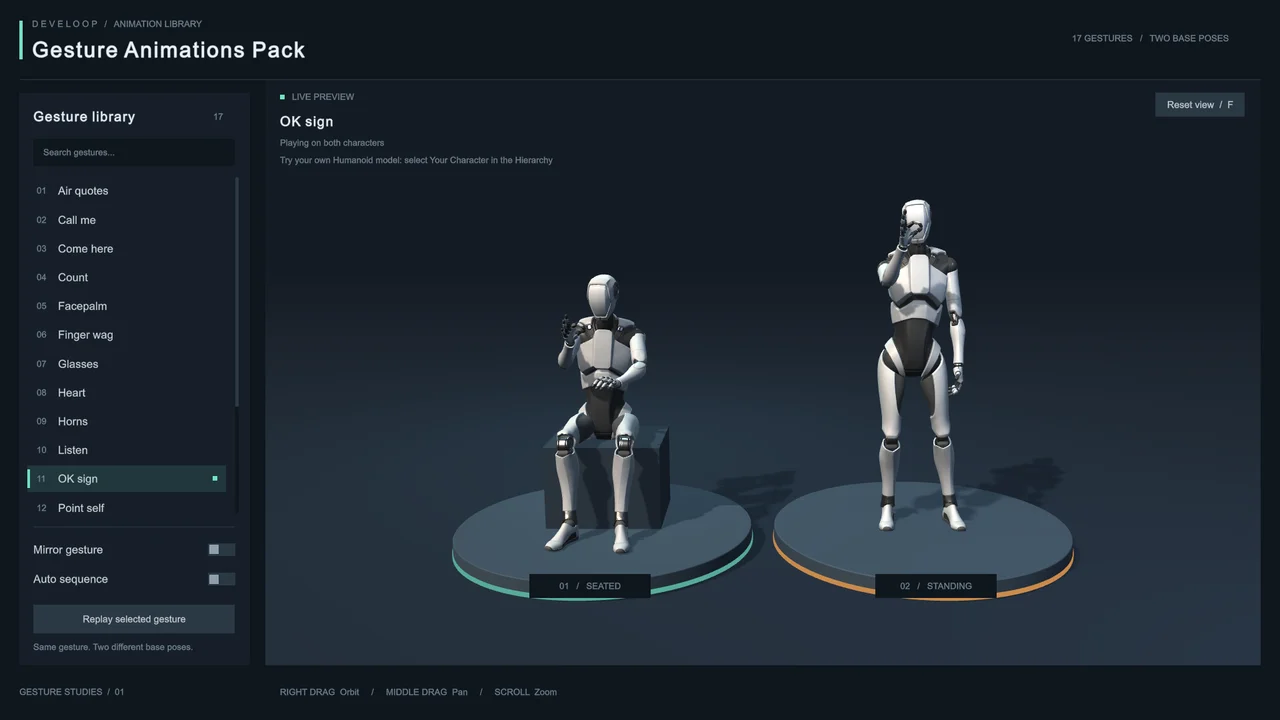
- Search filters the gesture library.
- Mirror gesture plays the gesture with the left hand.
- Auto sequence cycles through every gesture. Selecting a row stops it; Replay selected gesture plays your selection again.
- In the preview area, right-drag orbits, middle-drag pans and the wheel zooms. F or Reset view restores the camera. Scrolling over the library scrolls the list without moving the camera.
The scene needs nothing beyond URP: its interface is built-in IMGUI with Unity’s own font, so there is no TextMeshPro, UI package, Input System package, post-processing or external art to install.
For the soft shadows and antialiasing the scene was lit for, you can assign
Settings/Sample Pipeline.asset in Project Settings → Graphics (and clear any
Quality-level pipeline override). This is optional and changes how your whole
project renders; the scene never switches your pipeline by itself.
Try your own character
You can preview every gesture on your own model in the same scene:
- Make sure the model is imported as Humanoid — model import settings → Rig → Animation Type: Humanoid.
- Open
Scenes/GestureSample.unityand select Your Character in the Hierarchy. - Drag your model or its prefab into Model, and choose which sample character it replaces: Standing, Seated or Both.
- Press Play. Your model uses the same controller, so every gesture, Mirror gesture and Auto sequence work on it.
You can change the model or the target while in Play mode. If the model is not Humanoid, the preview area says what to fix and the sample character stays in place. Seated poses use the sample seat, so a very tall or very short character may sit above it or sink into it.
Masked gestures on your character
A masked clip animates only the parts of the body the gesture uses — one or both arms with the fingers, plus the head when the character looks at its hand. The clip starts and ends in the gesture pose; blending in from your animation and back out to it is the job of the Animator transitions.
There are two ways to set that up.
Option A: use the included controller
Controllers/gestures_sitting.controller already has:
- a Base Layer with an
Idlestate — the sitting idle; - one layer per avatar mask (
Gestures right_arm,Gestures right_arm_head, …), each resting in an empty state; - a Trigger parameter per gesture, named after it (
thumbs_up,heart, …); - a Bool parameter,
Mirror, that plays gestures with the other hand.
To put your own base animation under it, create an Animator Override
Controller from it and replace the sitting_idle clip with yours. That is
exactly how gestures_standing.overrideController swaps in the standing idle.
Then trigger gestures from code:
animator.SetBool("Mirror", false);   // true: left hand
animator.SetTrigger("thumbs_up");
The gesture fades in, plays once and fades back out to your animation on its own.
Option B: add gesture layers to your own controller
- Add a layer. Set Weight to 1, Blending to Override and Mask to
the gesture’s mask from
Masks/(see the table). - Create an empty state with no motion and make it the layer’s default state.
- Add a state with the gesture clip from
Gestures/. - Add a Trigger parameter and a transition from the empty state to the gesture: no exit time, fixed duration = Fade in, condition = the trigger.
- Add a transition from the gesture back to the empty state: exit time = Fade out starts at ÷ Masked clip (normalized), fixed duration = Fade out, no conditions.
Gestures that share a mask can share a layer — one empty state, several gesture states.
Left hand (mirroring)
Humanoid clips can be mirrored, so the left-hand versions need no clips of their own:
- In a controller: enable Mirror on the gesture state, or bind it to a
Bool parameter, and use the mirrored mask —
left_arminstead ofright_arm,left_arm_headinstead ofright_arm_head. Two-hand gestures keep their masks. - On an FBX take: enable Mirror in the take’s import settings, on the Animation tab.
The included controller already does this through its Mirror parameter: every
one-hand layer has a twin with the left mask and mirrored states.
Full-body FBX takes
FBX/gestures_sitting.fbx and FBX/gestures_standing.fbx hold every gesture
combined with sitting_idle and standing_idle respectively. The body follows
the idle while the arms and head perform the gesture, and every take starts and
ends in the idle pose, so it cuts cleanly to and from the idle. Takes are named
<gesture>_sitting and <gesture>_standing.
Both files are imported as Humanoid, with the avatar copied from the sample character and root motion baked into the pose. Use them when your character already uses these idles, when you want complete clips without layers — for a Timeline cutscene, say — or in another 3D application. The FBX files contain the sample character’s mesh as well.
Idle animations
Idle/sitting_idle.fbx and Idle/standing_idle.fbx are looping Humanoid idles.
The gestures were made on top of them, but the masked clips work over any other
animation too.
Render pipelines
The animations, masks and controllers work in every render pipeline. Only the sample scene and the sample character’s materials are URP (URP/Lit and URP/Unlit):
- URP — works as is.
- Built-in — select the materials in
Character/MaterialsandMaterialsand switch their shader to Standard. The albedo, normal and metallic-smoothness textures are kept. - HDRP — switch the same materials to HDRP/Lit and assign the textures
from
Character/Textures.
Sample scripts
The scripts in Scripts/ exist only for the sample scene. Your characters need
none of them.
| Script | What it does |
|---|---|
GestureTriggersPanel |
The gesture library, search, playback controls and character captions (IMGUI) |
CustomCharacterPreview |
Shows your Humanoid model in place of a sample character |
PreviewOrbitCamera |
The sample camera; reads IMGUI mouse and keyboard events, so it needs no input package or configured axes |
Skills for AI coding assistants
Four skills ship inside the package, under
Assets/DevEloop/GestureAnimationsPack/AI/Skills/. Each is a plain SKILL.md
that describes one part of the pack in the terms an assistant needs to act on
it — the real asset, mask and parameter names rather than plausible guesses.
| Skill | Covers |
|---|---|
gesture-animations-pack-setup-and-overview |
Contents, the install check, requirements, the 17 gestures with masks and timings, and an index of the others |
gesture-animations-pack-add-gestures |
Layering gestures over your own animation, triggering them from code, mirroring to the left hand |
gesture-animations-pack-full-body-clips |
The full-body FBX takes as Animator states or in Timeline |
gesture-animations-pack-sample-preview |
The sample scene, previewing your own model, fixing the sample materials in Built-in or HDRP |
Point your assistant at that folder, or copy the skills to wherever it reads them from. They are ordinary Markdown and depend on no particular tool.
Support
Questions, bug reports and suggestions are welcome. Include your Unity version, your render pipeline, and whether you are using the masked clips or the full-body takes.